
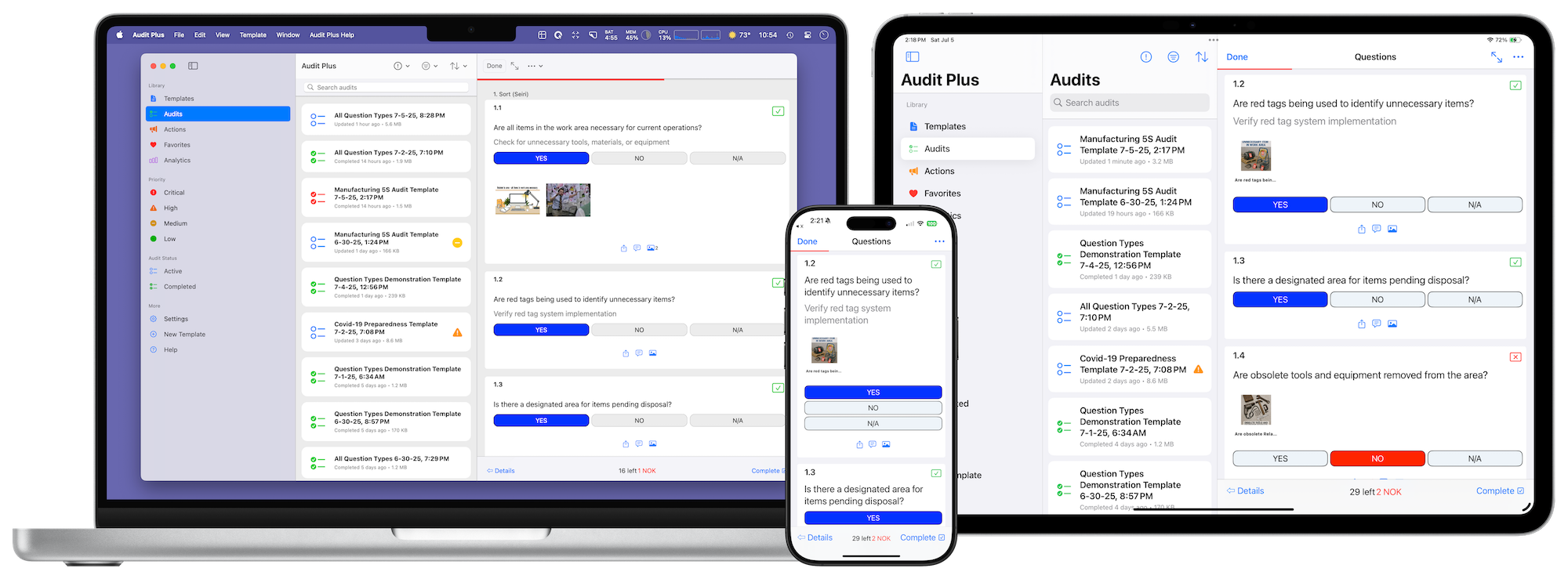
Welcome to Audit Plus, the all-in-one application for iOS, iPadOS, and macOS designed to revolutionize how you handle audits, inspections, and quality control. With a powerful local-first architecture and seamless iCloud sync, Audit Plus gives you complete control over your data, online or offline.
Core Capabilities
At its heart, Audit Plus allows you to design reusable templates that define the structure of your audits. From these templates, you can generate individual audits to capture responses, track compliance, and maintain a complete record of your inspections.
Common Use Cases
- Safety Inspections and Compliance Audits
- Quality Control and Manufacturing Checks
- Workflow Automation and Process Verification
- Equipment Maintenance and Service Records
- Facility and Property Inspections
A Modern, Secure Architecture
Audit Plus is built on a sophisticated local-first document system. This means your data is always stored securely on your device, ensuring you have full access even without an internet connection. When you are online, changes sync automatically and privately across your devices using iCloud.
- Local-First Design: Enjoy full functionality, whether you are online or offline.
- Transparent iCloud Sync: Your work is automatically backed up and synced across your iPhone, iPad, and Mac.
- Document-Based Storage: Each audit is a self-contained file (.apaudit), making it easy to share, store, and archive.
- Cross-Device Preferences: Your favorited templates and audit priorities sync seamlessly via CloudKit.
AI-Powered Features
Audit Plus integrates powerful artificial intelligence capabilities to streamline your workflow and enhance your audits. AI features use your own API keys from OpenAI, Google AI, or Anthropic.
Template Generation
Create complete audit templates from natural language descriptions. Simply describe what you need—like “safety inspection for construction sites” or “restaurant health inspection”—and AI generates a fully structured template with relevant sections, questions, and compliance criteria.
Image Generation
Generate custom images directly within your templates and audits. Create visual aids, safety diagrams, or reference images using AI image generation from OpenAI (DALL-E) or Google AI (Imagen).
Audio Generation
Convert text to natural-sounding speech for audio instructions, safety announcements, or narrated guidance. Perfect for creating audio content that can be played back during audits—ideal for hands-free environments or accessibility needs.
Video Generation
Create AI-generated video clips to demonstrate procedures, showcase proper techniques, or provide visual training materials. Available using an OpenAI or Google AI API key.
Bring Your Own API Key
Add your API keys from OpenAI, Google AI, or Anthropic in settings for direct access to AI providers. Keys are stored securely in the device keychain and never synced.
The Template System
The powerful template editor is the foundation of Audit Plus. It provides a comprehensive interface for creating standardized audit forms with a wide range of features:
- Multiple question types including text, numbers, dates, yes/no, and multiple choice.
- Organize audits with sections and subsections.
- Capture custom metadata with properties.
- Set compliance thresholds and pass/fail criteria.
- Protect sensitive information with password-protected templates.
- Automate tasks with completion actions (e.g., send an email or POST to a server).
The Audit Workflow
The audit process is designed to be intuitive, guiding you through a clear three-stage workflow:
- Details Stage: Capture essential metadata, location, and custom properties for the audit.
- Questions Stage: Answer all template questions, with support for attaching photos, videos, audio, and detailed notes.
- Completion Stage: Review responses, identify issues, and execute automated completion actions.
During an audit, you can flag items, track non-compliance, and the app will automatically calculate compliance scores, highlighting areas that require attention.
Advanced Features
Audit Plus is packed with features to streamline your workflow:
- Asset Management: Attach photos, videos, and audio to questions. Assets are compressed and packaged within the audit document for complete record-keeping.
- Inline Audio Playback: Audio attachments include an inline player for easy playback during audits.
- Flexible Export Options: Export completed audits to PDF, JSON, or trigger a custom server POST for seamless API integration.
- Automation: Use Shortcuts and home screen quick actions to create new audits from your favorite templates with a single tap.
Built for the Apple Ecosystem
Audit Plus is built from the ground up for Apple platforms, taking full advantage of the latest technologies in iOS 18, iPadOS 18, and macOS:
- Universal app for iPhone, iPad, and Mac.
- Support for multi-window, dark mode, and dynamic type.
- Full keyboard shortcut and trackpad gesture support.
Security and Privacy First
- All data is stored on your device and in your private iCloud account.
- Templates can be encrypted with password protection.
- API keys are stored securely in the device keychain and never synced.
- We perform no third-party analytics or tracking. Your data is yours.
Subscription Options
Audit Plus offers flexible plans to meet your needs:
- Free Tier: Explore core functionality with templates up to 15 questions, allowing you time to evaluate the software.
- Individual Plans: Unlock the full feature set with a monthly or yearly subscription.
Share Templates Without Subscription: Create shareable template links that allow other users to access templates without requiring individual subscriptions - perfect for distributing standard audit procedures.
Getting Started
Download Audit Plus from the App Store and start with the free tier to explore its capabilities. The intuitive interface guides you through creating your first template and conducting audits. For enterprises, visit our website to explore volume licensing options.